
If you’ve ever come across an unsegmented category, you already know the feeling: the frustration and wasted time of manually classifying, in an Excel spreadsheet, the hundreds of products that make up your planogram.
With OPENCatman + AI, that problem is solved. Let artificial intelligence do the work for you.
🔧 How does it work?
All you need to do is open your planogram and ask your AI for help.
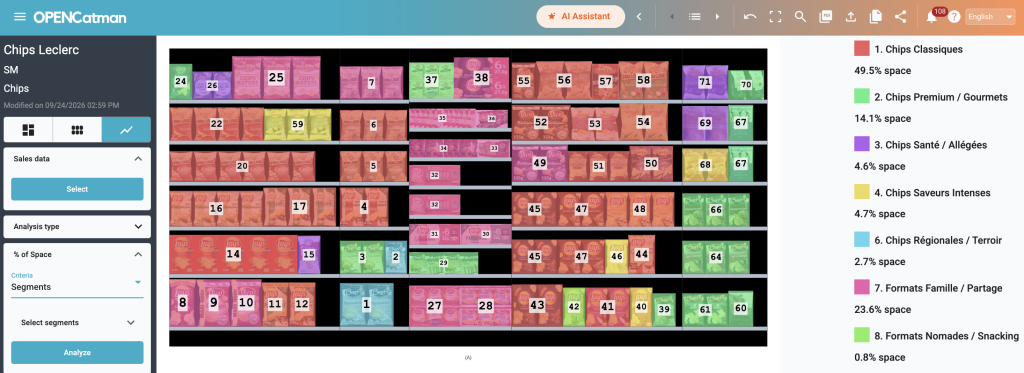
The AI automatically reviews the products in the planogram, suggests a hierarchy of segmentation criteria, and all you have to do is pick the option you prefer and accept it.
Within minutes, the data is loaded into the tool and you can view your planogram by segment, ready for analysis and optimization.
🔗 Connect your AI to OPENCatman and start saving time today
If you haven’t linked your AI to OPENCatman yet, do it now.
With the PRO version, all you need to do is edit your profile: at the bottom you’ll find the instructions to connect with ChatGPT and Claude using your Client ID and secret key.
Entering this information in your AI’s settings creates a direct access tunnel between the AI and your OPENCatman projects. This gives it access to:
- Planograms
- Fixture dimensions
- Products and their characteristics
- Sales data
Once processed, OPENCatman receives the results and applies them directly to your projects — saving you valuable time and taking your analysis capabilities much further.
🧠 OPENCatman + AI: everything becomes possible
Automation, speed, precision, and a new way of working with your categories.
Automatic segmentation is just the beginning.