
A planogram is read first as a picture: bottles boxed in white or black rectangles make it hard to read. With OPENCatman connected to an AI assistant, removing those backgrounds no longer happens photo by photo, but in batches of several hundred, in a few minutes.
Why manual cut-outs don’t scale
A category often holds 200 to 500 SKUs. Cutting out each photo by hand takes several minutes, and non-rectangular products (bottles, pouches, flasks, clear packaging) can’t be fixed with a simple crop. Online tools solve the shape, not the volume.
The 5-step method with OPENCatman + AI
The AI assistant connected to OPENCatman does the work; you make the request and approve the result.
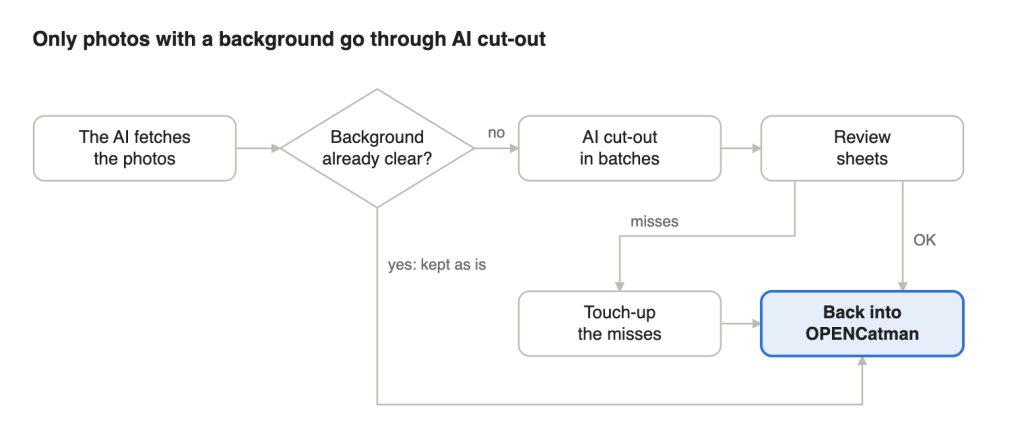
- The AI fetches every photo in the project at once, named by EAN code.
- The AI skips the ones that are already clean, with a transparent background.
- The AI cuts out the rest in batches, whatever the product’s shape, and crops tight around it.
- The AI builds review sheets: you spot the misses at a glance.
- The AI puts the photos back into OPENCatman, one by one or through bulk image import for large volumes.
On your side, one sentence is enough to start: “Remove the background from every photo in the Sparkling Wines project.”
The test: a champagne shelf
On a champagne shelf (Taittinger, Lanson, Charles Heidsieck, Piper-Heidsieck, Mumm), 6 of 9 photos already had a transparent background. The other 3, including a Mumm magnum whose glass was as dark as the background, were cut out in seconds, with no touch-ups. Photo by photo with an online tool, it took about eight steps per image.
Good practices and limits
- Start from the best photo you can get: a cut-out doesn’t create detail.
- Keep a visual check: glass, reflections and white labels remain tricky (expect 5 to 10% touch-ups on a hard batch).
- Make a copy of the project before a bulk run.
Conclusion
With OPENCatman + AI, removing backgrounds becomes a one-sentence request, processed in batches. Try it on your next planogram.